
How to integrate API security testing into CI/CD pipelines
Integrating API security testing into CI/CD is no longer just about running scans before release. Effective programs combine API discovery, authenticated DAST, authorization testing, and risk-based quality gates to ensure that every meaningful change is validated before reaching production.
In this guide, you’ll learn how to structure API security testing across the software development lifecycle, implement practical CI/CD integrations, configure developer-friendly security gates, and use continuous discovery and proof-based testing to maintain visibility into your evolving API attack surface.

One DevSecOps research paper indicates that while 63% of organizations have integrated API security testing into their CI/CD pipelines, only 12% run a security scan on every code commit. The underlying technology is there, but the massive adoption gap points to an architecture problem.
Teams add an API security scan to one pipeline stage, declare the integration complete, and move on. The scan runs before major releases. It doesn’t run on every pull request, every feature branch deployment, or every dependency update. The changes that slip through without validation are exactly where authorization regressions are introduced, authentication checks disappear during refactoring, undocumented endpoints are deployed, and broken access-control logic reaches production without any security validation.
The difference between organizations that “have API security in CI/CD” and organizations that actually continuously reduce API risk is not the mere presence of a scanner. It is whether security testing runs consistently enough to influence developer behavior. A scan that runs once before release can only identify vulnerabilities. A scan that runs on every meaningful change prevents vulnerabilities from becoming security debt in the first place.
This distinction matters because modern APIs change continuously. New endpoints are introduced, authorization logic evolves, integrations are added, and business workflows are modified. Security controls that were validated last month may no longer reflect the current state of the application. Effective API security therefore requires continuous validation that operates at the same speed as software delivery.
This guide explains where API security testing belongs at each stage of the software development lifecycle, how to configure quality gates that block real risk without disrupting delivery, how to implement API security testing in GitHub Actions, Jenkins, and GitLab CI, and how to connect discovery, authenticated DAST, and BOLA/BFLA testing into a continuous security workflow.
API security testing in CI/CD
API security testing in CI/CD is the practice of automating security vulnerability detection as an integrated stage of your continuous integration and delivery workflow – running API security scans at defined pipeline stages so that every code change is validated against security criteria before reaching production.
Effective integration covers the full API security lifecycle: discovery (finding all endpoints), authenticated DAST testing (confirming exploitable vulnerabilities), quality gates (blocking deployments on confirmed high-severity findings), and developer workflow integration (routing findings to issue trackers with remediation guidance).
The goal is not simply running scans. The goal is ensuring that every meaningful change receives security validation before deployment.
Why most API security CI/CD integrations fall short
Many organizations technically have API security integrated into CI/CD. Far fewer operate an API security program that consistently catches vulnerabilities before production.
The single-stage problem
The most common integration pattern places security scanning immediately before production release. This approach is better than manual testing alone, but it is not shift-left security. By the time a vulnerability is discovered:
- Development work may be weeks old
- Multiple features may depend on the vulnerable implementation
- Remediation can delay the release
In this model, security becomes a release blocker instead of a development safeguard. The result is predictable: teams either postpone releases or loosen security requirements to keep delivery moving.
The authentication gap
Many API vulnerabilities exist behind authentication. BOLA, the top OWASP API Security risk category, requires authenticated access. BFLA also requires authenticated access. Most authorization flaws, privilege escalation issues, and business logic vulnerabilities are inaccessible without valid credentials.
An unauthenticated scan may produce a clean report while missing a substantial portion of the real attack surface. This is why authenticated API testing is foundational to effective API security programs.
The false positive paralysis problem
Security gates only work when developers trust them. If scanners routinely generate false positives, teams quickly learn to ignore findings. Security reviews become negotiation exercises instead of remediation activities. Eventually, organizations face two equally bad options:
- Allow security gates to block legitimate releases
- Loosen thresholds until gates stop providing meaningful protection
Runtime validation (as with Invicti’s proof-based scanning) changes that equation by checking exploitability before reporting findings. Instead of asking developers to investigate theoretical risks, it provides evidence-backed vulnerabilities that can be acted on immediately. This allows security teams to create gates based on confirmed risk rather than assumptions.
The coverage drift problem
API environments rarely, if ever, stay static. New endpoints appear. Existing endpoints change. Authentication mechanisms evolve. New services are deployed.
A scan configuration that accurately represented an API six months ago may no longer reflect the current attack surface.
Without continuous API discovery to feed testing workflows, scan coverage gradually deteriorates. Vulnerabilities increasingly appear in areas that the security program no longer sees. Embedding the right API discovery methods into the process is crucial for maintaining accurate and systematic coverage.
The complete architecture for integrating API security scanning into CI/CD
Effective API security programs use multiple layers of validation rather than relying on a single scan.
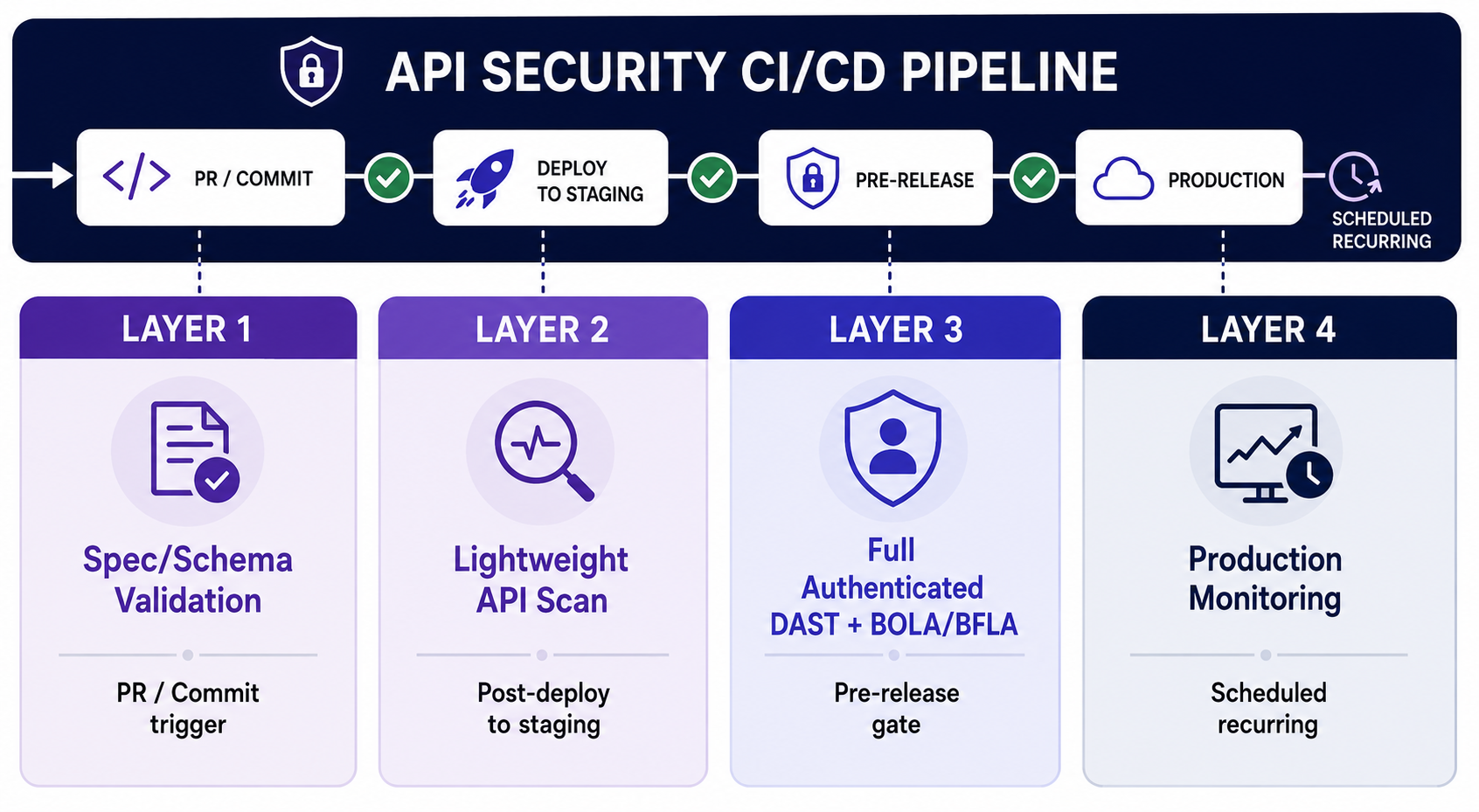
Layer 1: Schema and specification validation
Layer 1 focuses on API governance and design validation before code reaches a running environment. While this is not vulnerability scanning in the traditional sense, it prevents many API security issues from progressing further into the development lifecycle.
Common validation checks include:
- Verifying that newly introduced endpoints have authentication requirements defined
- Ensuring authorization scopes are documented consistently
- Identifying endpoints that bypass approved API gateway patterns
- Detecting schema changes that expose sensitive data fields
- Validating request and response structures against organizational standards
Because these checks operate on specifications rather than deployed applications, they complete in seconds and provide immediate developer feedback. The result is a fast, low-friction security layer that catches design-level issues before deployment.
Layer 2: Lightweight API security scanning in CI/CD
After deployment to staging, run a targeted API security scan. The main objective here is fast feedback. Rather than performing exhaustive testing, this stage focuses on identifying serious security issues introduced by recent changes. Organizations often configure this stage as either non-blocking or Critical-only blocking.
This layer is where many organizations first begin introducing automated API security testing into CI/CD. The key is balancing coverage with speed. Running a complete authenticated assessment on every deployment may not be practical for large environments, but running no security validation until release creates unnecessary risk.
Lightweight staging scans are designed to identify the highest-risk issues introduced by recent changes. Many organizations initially configure this stage as non-blocking or Critical-only while development teams become familiar with the workflow. Once baseline findings are addressed, the stage can gradually become more restrictive.
Layer 3: Full authenticated DAST and authorization testing
Before a production release, run comprehensive testing across the complete API surface. This stage includes:
- Authenticated API testing
- BOLA detection
- BFLA testing
- OWASP API Top 10 coverage
- Complete DAST validation
This is typically the primary security gate before release.
BOLA testing evaluates whether users can access resources that belong to other users at the same privilege level. BFLA testing evaluates whether users can access functions intended for higher-privilege roles. Both require multiple identities and authenticated workflows. Without those prerequisites, many of the most damaging API vulnerabilities remain invisible regardless of how often scans run.
Keep in mind that detecting authorization flaws is only one side of the equation. For guidance on eliminating these vulnerabilities during development, see How to prevent BOLA vulnerabilities in REST APIs.
Layer 4: Production monitoring and recurring validation
Security testing should not stop after deployment. Scheduled scanning verifies that:
- Production matches tested environments
- Infrastructure changes have not introduced risk
- Newly discovered endpoints receive coverage
- Third-party updates have not changed security posture
This layer closes the gap between release validation and real-world operation.
Production validation also addresses risks that originate outside the application codebase itself. Infrastructure changes, API gateway modifications, cloud configuration updates, third-party integrations, and dependency updates can all alter the security posture of an API after deployment – even if the API itself hasn’t changed. Scheduled scanning helps identify those changes before attackers do.
Just as importantly, production discovery provides feedback to the rest of the pipeline. Newly observed endpoints and services can be incorporated into future scan scope automatically, reducing the likelihood of coverage drift over time.
Platform-specific integration code – Invicti Platform examples
To illustrate how API scanning can be integrated into pipelines, let’s take a look at how Invicti Platform integrates into CI/CD using the scan-cli container. Note that these examples are conceptual – see the Invicti Platform documentation for detailed instructions.
The integration model is intentionally simple:
- The container connects to Invicti Platform
- The container triggers the scan
- The container waits for completion
- The container exits non-zero when configured build-failure conditions are met
With this setup, the pipeline does not need custom polling logic or result parsing.
Why the same integration pattern works across different CI/CD platforms
One of the advantages of the scan-cli model used by Invicti is that the specific CI/CD platform becomes largely irrelevant. Whether you use GitHub Actions, Jenkins, GitLab CI, Azure Pipelines, or another orchestration platform, the integration pattern remains the same:
- Store an API token as a CI/CD secret
- Reference the appropriate Invicti target
- Run the scan-cli container
- Allow the container’s exit code to drive the gate
The difference between a lightweight staging scan and a full release gate is not the pipeline code. It is the target configuration, scan profile, and build-failure conditions configured in Invicti Platform. This makes it possible to reuse the same integration pattern across multiple environments while enforcing different security requirements at different stages of the release process.
GitHub Actions integration example
# .github/workflows/api-security.yml
name: API Security Testing

on:
  push:
    branches: [staging, main]

jobs:
  api-security-staging:
    name: API Security Scan (Staging)
    runs-on: ubuntu-latest
    if: github.ref == 'refs/heads/staging'
    steps:
      - name: Run Invicti scan
        run: |
          docker run --rm \
            -e INVICTI_API_BASE_URL="https://platform.invicti.com" \
            -e INVICTI_API_TOKEN="${{ secrets.INVICTI_API_TOKEN }}" \
            -e INVICTI_TARGET_ID="${{ secrets.STAGING_API_TARGET_ID }}" \
            -e INVICTI_SCAN_AGENT="CloudAgent" \
            -e INVICTI_REPORT_TEMPLATE="Comprehensive" \
            -v ${{ github.workspace }}/publicdata:/home/invicti/publicdata/ \
            invicti/scan-cli

  api-security-release-gate:
    name: Full API Security Gate (Pre-Release)
    runs-on: ubuntu-latest
    if: github.ref == 'refs/heads/main'
    steps:
      - name: Run Invicti full scan
        run: |
          docker run --rm \
            -e INVICTI_API_BASE_URL="https://platform.invicti.com" \
            -e INVICTI_API_TOKEN="${{ secrets.INVICTI_API_TOKEN }}" \
            -e INVICTI_TARGET_ID="${{ secrets.PRERELEASE_API_TARGET_ID }}" \
            -e INVICTI_SCAN_AGENT="CloudAgent" \
            -e INVICTI_REPORT_TEMPLATE="Comprehensive" \
            -v ${{ github.workspace }}/publicdata:/home/invicti/publicdata/ \
            invicti/scan-cli
Understanding the configuration
Notice that the workflow does not contain any custom logic to authenticate scan users, poll scan status, parse results, or determine whether findings should fail the build. Those responsibilities are handled by Invicti Platform and scan-cli.
The only responsibility of the pipeline is launching the container with the correct target configuration. This keeps CI/CD definitions small, maintainable, and portable across environments.
Notice that the staging and release-gate jobs use the same container invocation. The difference is the target configuration referenced by INVICTI_TARGET_ID. In practice, the lightweight staging profile and the full authenticated release profile are configured in Invicti Platform rather than implemented as separate pipeline logic. This allows teams to reuse the same integration pattern while enforcing different security requirements at different stages of the release process.
Jenkins pipeline integration
pipeline {
    agent any

    environment {
        INVICTI_API_TOKEN    = credentials('invicti-api-token')
        INVICTI_API_BASE_URL = 'https://platform.invicti.com'
    }

    stages {

        stage('API Security — Staging') {
            when { branch 'staging' }
            steps {
                sh '''
                  docker run --rm \
                    -e INVICTI_API_BASE_URL \
                    -e INVICTI_API_TOKEN \
                    -e INVICTI_TARGET_ID="$STAGING_API_TARGET_ID" \
                    -e INVICTI_SCAN_AGENT="CloudAgent" \
                    -e INVICTI_REPORT_TEMPLATE="Comprehensive" \
                    -v "$WORKSPACE/publicdata:/home/invicti/publicdata/" \
                    invicti/scan-cli
                '''
            }
        }

        stage('API Security — Pre-Release Gate') {
            when { branch 'main' }
            steps {
                sh '''
                  docker run --rm \
                    -e INVICTI_API_BASE_URL \
                    -e INVICTI_API_TOKEN \
                    -e INVICTI_TARGET_ID="$PRERELEASE_API_TARGET_ID" \
                    -e INVICTI_SCAN_AGENT="CloudAgent" \
                    -e INVICTI_REPORT_TEMPLATE="Comprehensive" \
                    -v "$WORKSPACE/publicdata:/home/invicti/publicdata/" \
                    invicti/scan-cli
                '''
            }
        }
    }
}
GitLab CI integration
stages:
  - deploy-staging
  - api-security
  - release-gate

.invicti_scan: &invicti_scan
  image: docker:27
  services:
    - docker:27-dind
  script:
    - |
      docker run --rm \
        -e INVICTI_API_BASE_URL="https://platform.invicti.com" \
        -e INVICTI_API_TOKEN="$INVICTI_API_TOKEN" \
        -e INVICTI_TARGET_ID="$TARGET_ID" \
        -e INVICTI_SCAN_AGENT="CloudAgent" \
        -e INVICTI_REPORT_TEMPLATE="Comprehensive" \
        -v "$CI_PROJECT_DIR/publicdata:/home/invicti/publicdata/" \
        invicti/scan-cli

api-security-staging:
  <<: *invicti_scan
  stage: api-security
  variables:
    TARGET_ID: $STAGING_API_TARGET_ID
  only:
    - staging

api-security-release-gate:
  <<: *invicti_scan
  stage: release-gate
  variables:
    TARGET_ID: $PRERELEASE_API_TARGET_ID
  only:
    - main
Implementation notes
A few details are worth keeping in mind:
INVICTI_API_BASE_URLis region-specific. The examples use the US instance at https://platform.invicti.com, but other regions may have different URLs.- The examples use cloud-reachable targets and
CloudAgent. Environments that are not reachable from Invicti’s cloud services require an internal scan agent instead. - Authentication for the target is configured in Invicti Platform, not in the pipeline.
- Build-failure conditions are configured in Invicti and enforced through the container exit code.
The same overall integration pattern works across GitHub Actions, Jenkins, GitLab CI, and other platforms that can run Docker containers.
Again, these are illustrative examples only – for detailed technical information, see the Invicti documentation about integrating scans into CI/CD pipelines.
Configuring security quality gates
The quality gate is what determines whether API security testing improves delivery quality or becomes a source of friction.
Gating maturity journey: Start non-blocking and gradually move up
New security programs should begin in informational mode. A typical timeline would be:
- Weeks 1–2:
- Run scans
- Publish findings
- Establish baseline volumes
- Measure remediation workflows
- Weeks 3–4:
- Block only confirmed Critical findings
- Week 5 and beyond:
- Extend blocking to confirmed High findings
This approach builds confidence in the process and lets you refine any rough edges before introducing stricter enforcement.
Severity gate thresholds
For a proof-based scanner like Invicti’s API DAST, pairing a severity threshold with the Confirmed option creates a proof-based gate that blocks only confirmed exploitable vulnerabilities. This is what allows security teams to enforce meaningful controls without introducing the false-positive noise that causes developers to distrust security gates.
Authenticated test account management
Authentication is one of the most important configuration decisions in API security testing, and authenticated API testing is the cornerstone of any effective pipeline integration. Without authentication:
- BOLA testing is incomplete
- BFLA testing is incomplete
- Protected functionality remains invisible
In Invicti Platform, authentication is configured at the target level under Targets > Edit > Authentication. This approach provides several advantages:
- Credentials are managed centrally
- Pipelines only store API tokens
- Multi-user BOLA testing can be configured once
- Multi-role BFLA testing can be reused across scans
For BOLA testing, create at least two accounts with the same privilege level but ownership of different resources. For example, two customer accounts that each own different orders or records. This allows the scanner to verify whether user A can improperly access user B’s data.
For BFLA testing, create accounts representing different privilege levels, such as standard user, manager, and administrator. The scanner can then evaluate whether lower-privileged users can access administrative functionality that should be restricted.
These accounts should exist only in test environments and should be maintained alongside other testing assets so that security validation remains consistent across releases.
Connecting discovery to the scan pipeline
API discovery solves the coverage drift problem. The challenge is not simply finding APIs but also ensuring that newly discovered APIs are tested automatically.
Invicti’s discovery capabilities feed scan-ready API definitions into security workflows so that scan coverage evolves alongside the application. This creates three important outcomes:
- Scan configuration becomes dynamic: Security coverage evolves with the application rather than relying on static specifications maintained manually.
- New endpoints receive coverage automatically: Endpoints discovered through repository analysis, runtime discovery, or traffic analysis become candidates for future testing without manual intervention.
- Discovery and testing become connected processes: Rather than treating discovery and security testing as separate activities, the platform links them into a continuous workflow.
Discovery sources that keep scan coverage current
Effective API discovery combines multiple perspectives:
- Repository-based discovery identifies endpoints from source code and specifications before deployment. This provides early visibility into newly developed APIs.
- Application-based discovery uses DAST crawling and runtime analysis to identify endpoints exposed by running applications, including endpoints that may not appear in specifications.
- Traffic-based discovery analyzes observed API traffic to identify services and endpoints actively used in production environments.
Each discovery method finds different classes of assets. Together, they create a more complete picture of the attack surface and help ensure that future scans reflect the APIs that actually exist rather than the APIs teams believe exist.
Developer workflow integration: Getting findings to the right people fast
A vulnerability that sits in a dashboard for two weeks provides little value. Effective programs route findings directly into developer workflows.
On the Invicti Platform, integrations are configured centrally and can export findings to a wide variety of platforms, including Jira, GitHub Issues, GitLab Issues, ServiceNow, PagerDuty, and more.
Routing logic is maintained centrally in the platform rather than duplicated across individual CI/CD pipelines. This keeps workflow management consistent across repositories and reduces operational overhead as security programs scale.
Several principles improve developer adoption:
- Findings should reach the developer responsible for the affected code
- Evidence should be included automatically
- Medium findings should create backlog visibility even when they do not block deployments
With Invicti, proof-based findings help to ensure that developers receive actionable evidence rather than generic vulnerability descriptions.
Getting that high-quality finding data is critical to rapid remediation. Developers should not have to reproduce vulnerabilities manually before they can begin fixing them. Effective tickets should include:
- The exact request that triggered the issue
- The response demonstrating the vulnerability
- Proof-of-exploit evidence where available
- Affected parameters and endpoints
- Remediation guidance tailored to the vulnerability type
Providing this context reduces back-and-forth between security and development teams and shortens remediation cycles considerably.
Metrics to track how your API security CI/CD integration is working
Many teams measure activity rather than effectiveness, which can create a false sense of security in fast-moving environments. Here are four practical metrics that provide a more useful view of API testing maturity.
1. Coverage rate
Target: More than 95% of production-visible endpoints scanned within 24 hours of deployment to staging.
Coverage rate measures whether the pipeline is actually validating the attack surface that exists today rather than the attack surface that existed when the security program was first configured.
A low coverage rate usually indicates discovery gaps, outdated specifications, or scan configurations that have fallen behind the application.
2. Mean time to detection
Target: Detection within the same deployment cycle that introduced the vulnerability.
Mean time to detection measures how quickly the security program identifies vulnerabilities after they are introduced. In mature CI/CD environments, the goal is not simply finding vulnerabilities before production but finding them in the same development cycle that created them. The longer a vulnerability remains undetected, the more likely it is that additional code, dependencies, and business processes will be built around it, increasing remediation cost and complexity.
A low MTTD indicates that security testing is operating at development speed rather than functioning as a delayed audit process.
3. False positive rate
Target: Less than 5%.
High false positive rates typically indicate authentication or configuration issues. False positive rate is ultimately a measure of trust. Developers who repeatedly investigate findings that turn out not to be exploitable quickly lose confidence in security tooling and begin treating security alerts as background noise. High false positive rates also consume scarce AppSec resources because every finding requires manual verification before action can be taken.
A consistently low false positive rate allows teams to automate gating decisions with confidence, knowing that blocked builds are the result of genuine risk rather than scanner uncertainty.
4. Gate effectiveness
Target: 100% of confirmed High and Critical vulnerabilities prevented from reaching production.
Gate effectiveness measures whether the security controls in the pipeline are actually preventing risk from reaching production. If confirmed High or Critical vulnerabilities continue to appear in production environments, the problem usually lies in one of three areas: incomplete scan coverage, inadequate authentication during testing, or gate thresholds that are too permissive.
Tracking gate effectiveness over time helps organizations identify weaknesses in their CI/CD security architecture and verify that automated controls are reducing risk rather than simply generating reports.
How Invicti’s CI/CD integration closes the full loop
The architecture described in this guide reflects a broader shift in application security. Organizations no longer need separate workflows for API discovery, API security testing, vulnerability validation, prioritization, and remediation management. The tools already exist – the real challenge is bringing those activities together in a way that reduces risk without creating operational overhead.
Invicti approaches this through a DAST-first application security model. Rather than prioritizing theoretical findings, the platform focuses on vulnerabilities that can actually be reached and exploited in running applications. API DAST serves as both a testing technology and a validation layer that helps security teams prioritize real risk over noise. This allows organizations to use findings from across their security stack more effectively while maintaining focus on confirmed, actionable vulnerabilities.
The DAST-first approach is designed to reduce noise and focus teams on vulnerabilities that attackers can actually exploit. Rather than generating large volumes of theoretical findings that require manual investigation, Invicti validates exploitability wherever possible and uses those validated findings to drive prioritization, remediation, and release decisions. The result is faster triage, more efficient remediation, and greater confidence in automated security gates.
Within CI/CD environments, Invicti provides:
- A
scan-clicontainer that can run on any Docker-capable CI/CD platform and is configured entirely through environment variables - Authenticated scan configuration managed centrally on the target, supporting the multi-user and multi-role testing required for BOLA and BFLA detection
- Build-failure conditions that combine severity thresholds with a Confirmed option, allowing pipelines to block on confirmed exploitable findings rather than theoretical risks
- Native integration with branch protection and deployment-gate workflows through standard CI/CD exit codes
- Centralized export of findings into Jira, GitHub Issues, GitLab Issues, ServiceNow, PagerDuty, and other workflow systems
- Continuous discovery that updates scan coverage as the API surface evolves
Because scans are designed for CI/CD workflows and typically complete in minutes rather than hours, teams can embed security validation into normal delivery processes without introducing significant release delays. This enables a more developer-led approach to application security while maintaining meaningful security oversight.
Completing the API security lifecycle
This article on CI/CD integration completes our API security lifecycle series that also covers:
- API discovery methods
- API discovery in Kubernetes and runtime environments
- Authenticated API scanning
- BOLA detection
- BOLA prevention
- BOLA and BFLA comparison
Each capability reinforces the others. Discovery improves coverage, authentication improves detection, authorization testing identifies real access-control flaws, and CI/CD integration ensures those practices work continuously rather than happen occasionally. Together, they form a practical framework for reducing API risk throughout the software development lifecycle.
Conclusion: Build an API security pipeline that actually runs on every change
Most API security CI/CD integrations solve only part of the problem. They might add a security scan somewhere in the delivery pipeline but usually fail to validate every meaningful change before production.
Proof-based API security testing on the Invicti Platform helps organizations embed authenticated DAST, BOLA and BFLA testing, discovery, and developer workflow integration directly into CI/CD processes while keeping development velocity intact.
To learn how Invicti fits into your existing app and API development pipelines, review the documentation and, when you’re ready, request a demo to see API discovery and proof-based API testing at work.
Frequently asked questions
Frequently asked questions about integrating API security into CI/CD
Typical API security CI/CD integration follows a four-layer architecture:
- OpenAPI specification validation on every pull request
- Lightweight authenticated API scan after each staging deployment
- Full authenticated DAST scan with BOLA/BFLA testing as a pre-release gate
- Scheduled production monitoring.
Each layer is triggered at different pipeline stages, with quality gates configured to block deployments on confirmed high and critical severity findings.
API security testing should run at multiple pipeline stages, not just pre-release. A lightweight scan after every staging deployment catches vulnerabilities on every change, when they’re cheapest to fix. A full authenticated scan gates production releases. Specification validation runs on every pull request. The goal is catching vulnerabilities in the same deployment cycle they’re introduced, not in the next quarterly pen test.
A security quality gate is an automated checkpoint in the CI/CD pipeline that evaluates security scan results against a defined severity threshold and blocks the deployment pipeline if findings exceed the threshold. Effective API security gates block on confirmed Critical findings at all stages and confirmed High findings at the production release stage while routing Medium findings to issue trackers without blocking. Exploitability validation such as Invicti’s proof-based scanning is required to build gates that developers trust and respect.
With a solution like the Invicti Platform, scan authentication is configured per scan target in the platform, not in the pipeline. You set up dedicated test accounts for each role level (admin, manager, standard user) in your staging environment, and the scan-cli pulls those credentials automatically at scan time. The only secret the pipeline holds is the API token that authorizes the scan trigger – target credentials never have to be stored in CI/CD secrets. Where supported, AI-aided auto-login can establish the session from a username and password without a recorded login sequence.
Start with non-blocking informational mode to establish the baseline finding volume in your existing codebase and refine your criteria. Ramp up incrementally: block on Critical only, then extend to High. Use a validation method like proof-based scanning to avoid reporting false positives that erode developer trust.
Scan time depends on API surface size, scan depth, and authentication configuration. Lightweight scans typically complete in minutes. Full authenticated scans may take longer depending on complexity. Modern API-native security testing tools are designed to fit CI/CD cadences without becoming release bottlenecks.
Yes, but it requires multi-user and multi-role test account configuration, plus a stateful scanner with multi-session support. BOLA testing requires accounts with equivalent privilege levels and different resource ownership. BFLA testing requires multiple role levels. Invicti Platform supports configuring these identities on the target and reusing them automatically during scans.
With a consolidated AppSec platform like Invicti, you configure issue-tracker integrations centrally. Findings can be exported automatically to Jira, GitHub Issues, GitLab, or ServiceNow with supporting evidence and remediation guidance included.
Four key metrics are coverage rate, mean time to detection, false positive rate, and gate effectiveness. Together, these measurements indicate whether security testing is consistently identifying and preventing exploitable vulnerabilities before production deployment.
Experience the future of AppSec
