
IaC security in CI/CD: Best practices for a secure pipeline
Most infrastructure as code (IaC) security implementations stop at running a scanner and failing the build on critical findings. But that’s only one stage of what should be a seven-stage pipeline, and recent history shows it’s not even the stage where things can go most wrong.
In March 2026, the threat actor TeamPCP compromised open-source IaC scanners Trivy and KICS by poisoning their GitHub Actions and Docker images – so any pipeline that referenced those tools by a mutable version tag silently executed attacker-controlled code and exposed its credentials. The attack was a direct hit on the scanning layer most teams treat as their primary IaC security control.
This guide walks through the complete IaC security pipeline, from pre-commit through post-deployment application validation, with the specific tools, configurations, and gates that belong at each stage – including how to reference those scanners safely now that mutable tags have been demonstrated as an attack vector.

Key takeaways
- A complete secure IaC pipeline has seven stages: pre-commit, branch protection, pull request (PR) scanning, continuous integration and continuous delivery/deployment (CI/CD) pipeline scanning, infrastructure plan review, post-deployment drift detection, and application validation. Most teams implement only stages three and four.
- The tools that scan your infrastructure are now a documented attack surface in their own right. In March and April 2026, the threat actor TeamPCP compromised Trivy’s binary, GitHub Action, and Docker images, then did the same to Checkmarx KICS days later. The affected vendors removed or replaced malicious artifacts and published remediation guidance, but the incidents changed what “pin your scanner” has to mean.
- IaC scanning finds misconfigurations in configuration code but cannot find application vulnerabilities in the services that IaC deploys. A correctly configured Terraform module deploying an API vulnerable to SSRF is a security failure that no IaC scanner catches. Dynamic application security testing after deployment can close that gap.
- Invicti ASPM correlates IaC findings from tools like Checkov and Trivy with DAST findings to place infrastructure and application risk into a single, unified view instead of two disconnected dashboards.
What is IaC security in CI/CD?
IaC security in CI/CD is the practice of enforcing infrastructure-as-code controls, including misconfiguration scanning, secrets detection, policy enforcement, supply chain validation, and application-layer DAST testing, at every stage of the CI/CD pipeline – from pre-commit hooks through post-deployment runtime validation. An effective IaC security pipeline treats security as a continuous process rather than a single point-in-time scan.
The complete seven-stage IaC security pipeline
Most teams implement stage three or four and stop there. The rest of this guide covers why each of the seven stages catches something the others structurally cannot, and what wiring all of them together looks like in practice.
All code examples provided below are illustrative only and should be modified to your specific needs before use.
Stage 1: Pre-commit – the fastest feedback loop
Pre-commit hooks run on the developer’s machine before git commit executes, which means feedback arrives in seconds, before code reaches a shared repository or triggers a CI/CD run.
What belongs at this stage:
# .pre-commit-config.yaml
repos:
  - repo: https://github.com/antonbabenko/pre-commit-terraform
    rev: v1.96.0  # pin to a specific release
    hooks:
      - id: terraform_tflint
      - id: terraform_validate
      - id: terraform_fmt

  - repo: https://github.com/gitleaks/gitleaks
    rev: v8.21.0
    hooks:
      - id: gitleaks

  - repo: https://github.com/bridgecrewio/checkov
    rev: 3.2.300
    hooks:
      - id: checkov
        args: ['--check', 'HIGH,CRITICAL', '--quiet']
TFLint handles Terraform-specific syntax and type validation. Gitleaks or git-secrets stop credentials before they ever reach the repository. A fast, critical-only pass of Checkov catches the most severe misconfigurations without slowing the developer down.
What doesn’t belong here are full compliance scans, all-checks Checkov runs, or anything network-dependent. A pre-commit check should finish in well under 30 seconds. A hook that takes four minutes gets disabled the first time someone is in a hurry, and from that point it’s not protecting anything.
For deeper coverage of what each of these scanners checks for, see the IaC Security Scanning Tools Guide.
Stage 2: Branch protection – the governance gate
Branch protection is the repository-level control that enforces process regardless of what any individual developer does:
# GitHub branch protection settings for main, production, and staging
require_pull_request_before_merging: true
required_approving_review_count: 1
dismiss_stale_reviews: true
require_code_owner_reviews: true
require_status_checks_to_pass: true
required_status_checks:
  - "checkov-scan"
  - "trivy-config"
  - "secrets-scan"
allow_force_pushes: false
allow_deletions: false
Pair this with a CODEOWNERS file that routes infrastructure changes to the right reviewers:
# .github/CODEOWNERS
/terraform/            @security-team @platform-team
/cloudformation/       @security-team
/kubernetes/           @security-team @devops-team
/.github/workflows/    @security-team
That last line is especially important. Adding .github/workflows/ to CODEOWNERS together with protected branches that require code-owner approval means that any change to the pipeline definition itself also requires review, which is exactly the kind of change an attacker with stolen credentials would try to slip through unreviewed.
Stage 3: PR scanning, and the incident that changed what “pin it” means
PR-triggered scanning runs when a pull request opens or updates, posting results as status checks and inline comments so developers see findings where they’re already making decisions.
The commit SHAs below were valid at the time of publication, but verify the current vendor-recommended release and corresponding full commit SHA before adopting them in your own workflow:
# .github/workflows/iac-security-pr.yml
name: IaC security scan

on:
  pull_request:
    paths:
      - '**.tf'
      - '**.tfvars'
      - '**/*.yaml'
      - '**/*.yml'
      - 'Dockerfile*'
      - '**/k8s/**'
      - '.github/workflows/**'

jobs:
  checkov-scan:
    runs-on: ubuntu-latest
    permissions:
      contents: read
      security-events: write
      pull-requests: write
    steps:
      - uses: actions/checkout@11bd71901bbe5b1630ceea73d27597364c9af683  # v4, pinned to commit SHA
      - name: Run Checkov
        uses: bridgecrewio/checkov-action@99bb2caf247dfd9f03cf984373bc6043d4e32ebf  # v12.1347.0, pinned to full commit SHA
        with:
          directory: .
          framework: terraform,kubernetes,dockerfile,cloudformation
          soft_fail: false
          output_format: sarif
          output_file_path: checkov.sarif

      - name: Upload SARIF
        if: always()
        uses: github/codeql-action/upload-sarif@c4dd10e44af883a891fe31ced449bcb4a6728b9b  # v3.37.6, pinned to full commit SHA
        with:
          sarif_file: checkov.sarif

  trivy-config:
    runs-on: ubuntu-latest
    steps:
      - uses: actions/checkout@11bd71901bbe5b1630ceea73d27597364c9af683
      - name: Run Trivy config scan
        uses: aquasecurity/trivy-action@57a97c7e7821a5776cebc9bb87c984fa69cba8f1  # v0.35.0, pinned to full commit SHA
        with:
          scan-type: 'config'
          scan-ref: '.'
          severity: 'HIGH,CRITICAL'
          exit-code: '1'
          format: 'sarif'
          output: 'trivy-results.sarif'

      - name: Upload Trivy SARIF
        if: always()
        uses: github/codeql-action/upload-sarif@c4dd10e44af883a891fe31ced449bcb4a6728b9b  # v3.37.6, pinned to full commit SHA
        with:
          sarif_file: trivy-results.sarif
You might be wondering why every one of those actions is pinned to a commit hash instead of the usual version tags. This is current best practice, and with very good reason.
In March 2026, a threat actor tracked as TeamPCP gained initial access through a misconfiguration in Trivy’s GitHub Actions environment and used it to publish a malicious Trivy release, along with poisoned versions of the trivy-action and setup-trivy GitHub Actions. Every workflow that referenced those actions by a mutable version tag, including @latest or @v0.35, executed attacker-controlled code that harvested cloud credentials, SSH keys, and Kubernetes tokens from the build environment. Days later, the same actor used credentials stolen in that first wave to compromise the Checkmarx KICS GitHub Action the same way, force-pushing malicious commits across all of that repository’s release tags. A separate compromise of the KICS Docker Hub image followed in April.
Both incidents are remediated. The safe references at the time of writing are trivy-action v0.35.0 and setup-trivy v0.2.6 – always check Aqua Security’s and Checkmarx’s current advisories before pinning, since safe versions get superseded. The lasting lesson is about the pinning itself, and it has two separate parts:
- Pinning in GitHub Actions: Pin to a full commit SHA, not a version tag. A commit SHA is immutable in git – a tag like
@v4can be moved to point at a different commit at any time, which is exactly how the KICS Action compromise worked. - Pinning container images pulled from a registry: A version tag isn’t enough, either, because registries let a publisher reassign what a tag points to. The KICS Docker Hub compromise in April overwrote five existing tags, including a pinned-looking
v2.1.20, to malicious digests. The actual fix is pinning to a content digest, socheckmarx/kics@sha256:...instead ofcheckmarx/kics:v2.1.20.
Use Dependabot or Renovate to keep SHA pins current without doing it by hand:
# .github/dependabot.yml
version: 2
updates:
  - package-ecosystem: "github-actions"
    directory: "/"
    schedule:
      interval: "weekly"
The SARIF uploads you see in the scripts are used for a separate reason: they populate the GitHub Security tab, so developers see IaC findings inline with the rest of code review instead of needing a separate login to a security dashboard.
Stage 4: CI pipeline gate for comprehensive policy enforcement
The CI pipeline gate runs after merge to main or staging, and it’s more comprehensive than the PR-stage scan: full compliance framework checks, custom organizational policy, SBOM generation, and (for Kubernetes-heavy environments) a Kubescape pass against the CIS Kubernetes Benchmark. A custom OPA policy written in Rego looks like this:
package terraform.security

deny[msg] {
  resource := input.resource_changes[_]
  resource.type == "aws_security_group_rule"
  resource.change.actions[_] != "delete"

  after := resource.change.after
  after.type == "ingress"
  after.cidr_blocks[_] == "0.0.0.0/0"

  msg := sprintf(
    "Security group rule %q allows unrestricted ingress from 0.0.0.0/0",
    [resource.address]
  )
}
This simplified policy evaluates Terraform plan JSON and rejects security group rules that introduce unrestricted IPv4 ingress. In a production policy set, you would normally add conditions for approved ports, protocols, and documented exceptions.
You can then define separate gating behavior for hard blocks and soft warnings:
# Block on critical findings
trivy config --severity CRITICAL --exit-code 1 .

# Report high-severity findings without blocking
trivy config --severity HIGH --exit-code 0 .
Stage 5: Terraform plan review – the pre-apply safety check
terraform plan shows the exact changes that will be made to live infrastructure before terraform apply runs them. Reviewing that output catches things that template scanning structurally can’t, because a scanner reads the template file, not the computed diff against the current state of your actual infrastructure.
Plan review can catch risks like:
- A resource that reads fine in the template but will delete production infrastructure once applied
- A change that opens a new public ingress rule on an existing security group
- A module update that quietly widens the effective permission scope of an IAM role
Automate the check with OPA against the plan’s JSON output:
terraform plan -out=tfplan.binary
terraform show -json tfplan.binary > tfplan.json
opa eval --data policy/ --input tfplan.json "data.terraform.analysis.allow"
Atlantis automates plan generation on PR updates and posts the diff as a comment, so a reviewer sees a human-readable summary of what will change in production before approving the merge.
State file security belongs here, too. Local Terraform state files contain sensitive values in plain text and are a real secret-exposure risk on their own:
terraform {
  backend "s3" {
    bucket       = "company-terraform-state"
    key          = "prod/terraform.tfstate"
    region       = "us-east-1"
    encrypt      = true
    kms_key_id   = "arn:aws:kms:us-east-1:..."
    use_lockfile = true
  }
}
Remote, encrypted state with locking is a baseline requirement for any team-shared Terraform workflow, not an advanced option.
Stage 6: Post-deployment, drift detection and live validation
IaC scanning checks configuration code but has no visibility into manual console changes, automated remediations that touch live resources outside the pipeline, or CVEs disclosed after the last scan ran. Scheduled drift detection catches the first two:
terraform plan -refresh-only -detailed-exitcode
# exit code 2: Terraform detected out-of-band changes that would update state
# exit code 0: no drift detected
CSPM tools such as Prowler cover the resources IaC scanning was never positioned to see in the first place, including shadow infrastructure provisioned outside the pipeline entirely:
prowler aws --checks cis_level1Run drift detection on a schedule, not just after every deployment; drift accumulates from changes that have nothing to do with your last merge.
Stage 7: Application validation – the stage IaC pipelines miss
IaC scanning confirms that infrastructure configuration code meets policy. It has no way to confirm whether the applications running on that infrastructure are themselves secure, because it never looks at application code or application behavior.
A Terraform module can pass every check in stages one through six: private, encrypted storage, least-privilege IAM, no public ingress – and still provision a web application with SQL injection or broken authentication. The infrastructure is correctly configured and secure, but the application is not. No IaC scanner can ever see the difference it’s not designed to look at that layer.
The risk compounds when the two layers interact. Say IaC scanning flags an overly permissive outbound rule on a security group – a medium-severity finding that gets triaged and deprioritized during a busy sprint. Later, DAST testing finds an SSRF vulnerability in the application running behind that security group. On its own, neither finding is severe. When they are combined, the SSRF lets the application make arbitrary outbound requests, while the permissive security group means those requests aren’t constrained to where they’re supposed to go. The effect is a credential exfiltration path assembled from two findings that looked unrelated in two different tools.
This is the kind of correlation that Invicti ASPM is built to surface. It can ingest IaC findings from tools like Checkov and Trivy alongside findings from DAST and its own built-in IaC scanner, so a compound risk like this one shows up as a single, higher-priority item instead of two separate low-priority tickets in two separate backlogs.
Triggering DAST after IaC provisions a new environment might look like this:
# .github/workflows/post-deployment-validation.yml
- name: Run Invicti post-deployment scan
  run: |
    docker run --rm \
      -e INVICTI_API_BASE_URL="https://platform.invicti.com" \
      -e INVICTI_API_TOKEN="${{ secrets.INVICTI_API_TOKEN }}" \
      -e INVICTI_TARGET_ID="${{ secrets.DEPLOYED_TARGET_ID }}" \
      -e INVICTI_SCAN_AGENT="CloudAgent" \
      invicti/scan-cli
Invicti’s CI/CD integration can trigger a scan after deployment and return the scan outcome through the container exit code. Build-failure criteria can be configured in Invicti rather than recreated as custom result-parsing logic in every pipeline.
Pipeline hardening that applies across every stage
A few best practices don’t belong to any single stage – they’re what keeps the pipeline itself from becoming the weakest link.
Pin every external action and know which kind of pin you need
SHA-pin GitHub Actions and digest-pin container images were both exploited in the TeamPCP campaign, and neither substitutes for the other.
Prefer ephemeral runners over persistent ones
Wiz’s 2025 research found that 35% of enterprises run non-ephemeral, self-hosted runners – persistent environments that accumulate state and give an attacker somewhere to pivot from. A runner that starts clean for each job and terminates afterward doesn’t offer that foothold and should be preferred for security.
Use short-lived and scoped pipeline credentials
OpenID Connect (OIDC) federation avoids storing long-lived cloud credentials as CI/CD secrets in the first place:
- uses: aws-actions/configure-aws-credentials@7474bc4690e29a8392af63c5b98e7449536d5c3a  # v4.3.1, pinned to full commit SHA
  with:
    role-to-assume: arn:aws:iam::ACCOUNT:role/github-actions-deployment
    aws-region: us-east-1
This is also the control that limits how bad a scanner compromise like TeamPCP’s can actually get: a stolen token that is short-lived and narrowly scoped is worth far less to an attacker than a static key with broad permissions.
Separate build permissions from deployment permissions
A build step should have read-only access to source. A compromised build step with write access to infrastructure is a much worse day than a compromised build step that can only read code.
Version-control the pipeline definitions themselves, and require review on changes to them
A .github/workflows/ file or Jenkinsfile is also code. Treat it with the same branch protection and review requirements as the IaC it’s meant to secure, since a malicious pipeline change can bypass every scan this guide describes.
Putting the seven stages together
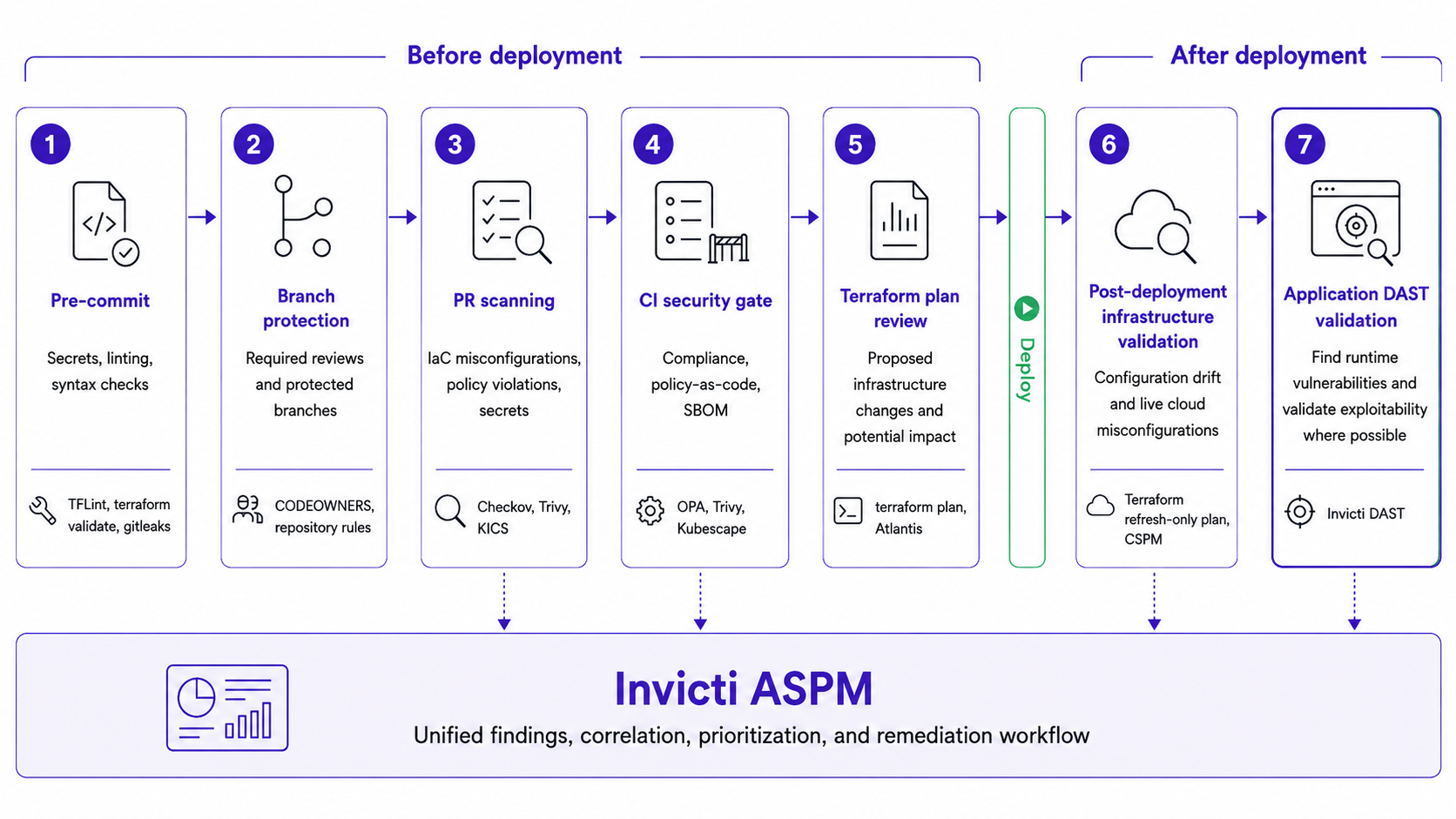
Each stage catches a category of risk the others structurally can’t. Each one is cheaper to fix at that stage than the stage that follows it. That’s the strongest argument for building all seven rather than stopping at whichever one is easiest to bolt on first.
Seven stages – each necessary to catch what the others miss
A complete IaC security pipeline isn’t one scan at one point in the process. It’s seven checkpoints from pre-commit to post-deployment application validation, and 2026 gave a concrete demonstration of why the scanning stages alone aren’t the whole story: the scanners themselves can be the target. Invicti ASPM connects the last stage – application DAST validation – to the IaC scanning stages that come before it, so infrastructure and application teams work from one prioritized view of risk instead of two disconnected ones.
Next steps
- Read the IaC scanning tools guide.
- Check your overall IaC security best practices
- Request a demo of the Invicti Platform to cover your entire pipeline with IaC, DAST, and ASPM working in tandem.
Frequently asked questions
Frequently asked questions about IaC security in CI/CD pipelines
A complete approach combines pre-commit checks, branch protection, PR scanning, CI policy enforcement, Terraform plan review, post-deployment drift detection, and application DAST validation. Together, these controls cover risks from code creation through deployed application behavior.
Run IaC scanners such as Checkov and Trivy as pull request or CI jobs, and upload SARIF results to GitHub code scanning where available. Pin third-party GitHub Actions to full commit SHAs rather than mutable version tags, and use Dependabot or Renovate to keep those pins current.
Pre-commit checks provide fast local feedback before code reaches the repository. CI pipeline scanning runs centrally with more time and compute for broader policy, compliance, and security checks. Neither replaces the other.
terraform plan shows the changes Terraform proposes based on the configuration and current state. This can expose risks that aren’t obvious from a template alone, such as resource deletion, new public ingress, or expanded IAM permissions.
DAST tests the running application after deployment for application-layer vulnerabilities that IaC scanning cannot see. This adds runtime validation for issues such as injection, authentication, and authorization weaknesses within the scan’s coverage.
Run scheduled terraform plan -refresh-only -detailed-exitcode checks to identify out-of-band infrastructure changes, and use CSPM tooling to monitor resources that may exist outside Terraform management. GitOps workflows can also help reconcile live state with the intended configuration.
Invicti ASPM brings IaC findings from tools such as Checkov and Trivy together with DAST, its own IaC scanning, SAST, SCA, secrets, and other AppSec findings in a unified view. Invicti DAST adds post-deployment runtime testing, while ASPM helps teams correlate and prioritize risk across infrastructure and application security.
Experience the future of AppSec
